
You're halfway through a Spotify episode and someone says something worth keeping. You pause. Open Notes. Type three words. Forget the rest before you hit play again.
Or worse: you finish the episode, feel like you learned something, and have nothing to look at later.
Spotify is built for listening. It is not built for note-taking. This guide is about turning a Spotify episode into notes you can actually keep. If you only need the raw text, see how to copy a Spotify podcast transcript. If you want a file on disk, see how to export a Spotify podcast transcript as PDF. Here the job is notes.
Quick answer: Copy the Spotify episode URL, paste it into the Spotify podcast transcript generator, and open AI Insights. You get a summary, key takeaways, topics, and notable quotes. That is basically a first draft of your notes, plus the full transcript if you want to dig deeper. Most episodes finish in about a minute.
Does Spotify have a podcast note generator?
No. Not in any useful sense.
Some episodes have a native transcript for reading along. Listener controls differ from creator tools: eligible show owners can download their own transcripts. Check the publisher's existing text first; generate a separate transcript when you need an independent document from supported public audio.
Spotify also has AI features in some markets where you can ask questions about an episode. When it works, it's handy for a quick check. It still doesn't give you a note file you own.
Fine for listening. Useless if you want notes in Notion, Obsidian, Google Docs, or a PDF folder.
What "notes from a Spotify podcast" should look like
Good episode notes are not a wall of text. They're the parts you'd actually reread.
A workable set usually has a short summary of what the episode was about, a handful of takeaways that are specific (not "they talked about marketing"), a few quotes worth keeping with who said them if you can tell, and topics or keywords so you can find the episode again later. Access to the full transcript helps when a takeaway needs context.
A podcast episode summary answers "what was this about?" Notes answer "what do I want to remember and reuse?" Close, but not the same job.
And this isn't podcast show notes either. Show notes are what creators publish under an episode. This post is for listeners who want personal notes from someone else's show.
How to generate notes from a Spotify podcast
You don't need to pause every thirty seconds. Copy the episode link and let transcription and AI do the first pass.
Step 1: Copy the Spotify episode URL
- Desktop: right-click the episode → Share → Copy link to episode
- Mobile: tap ⋯ → Share → Copy link
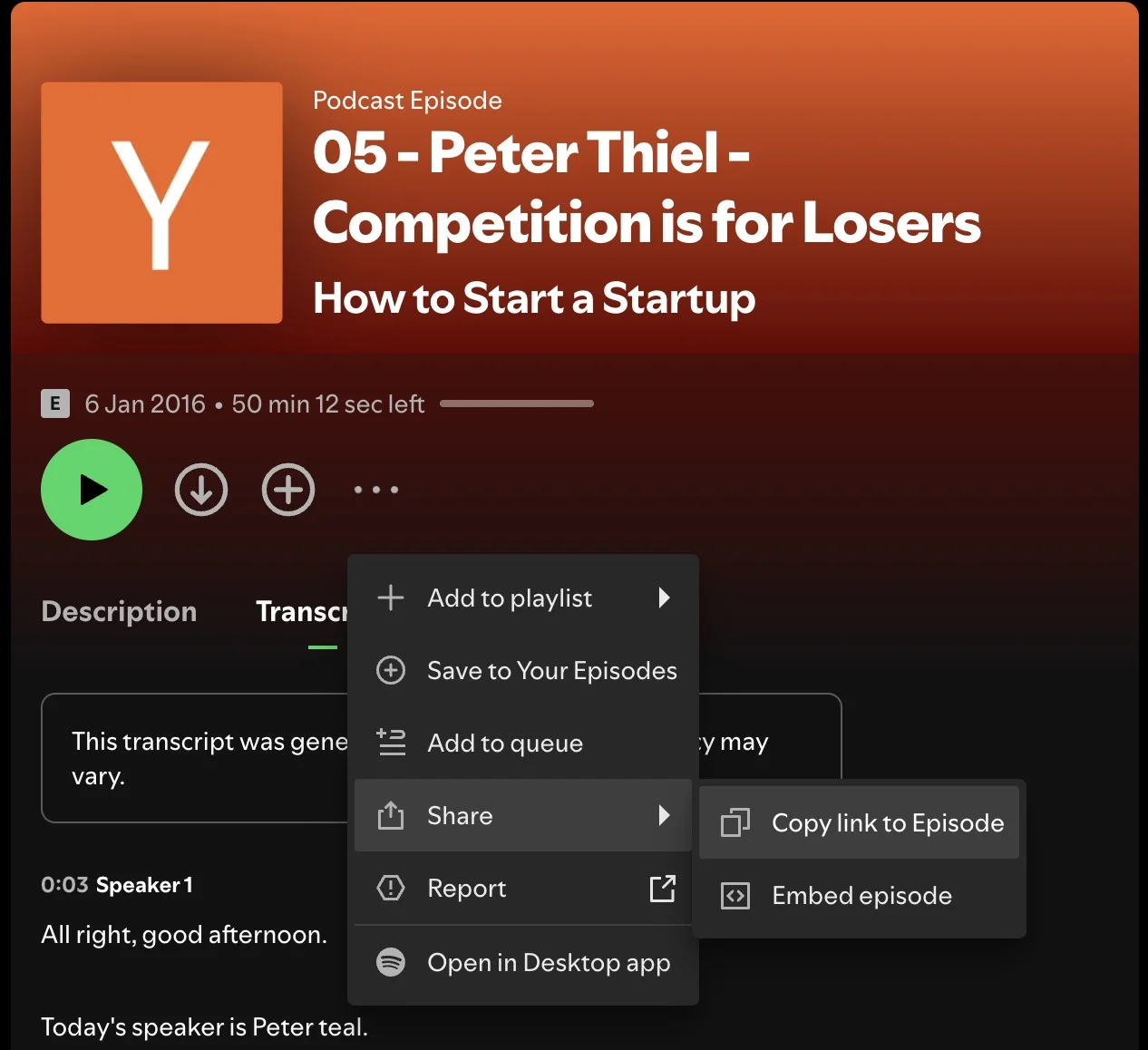
Example: https://open.spotify.com/episode/4rOoJ6Egrf8K2IrywzwOMk
The episode needs to be public. Login-walled or subscriber-only audio won't work.
Step 2: Paste it into Podtyper
Go to podtyper.com, paste the URL, and hit Transcribe.
A one-hour episode usually comes back in about a minute. Transcription and AI insights run together, so you're not waiting for one, then the other.
Step 3: Open AI Insights (that's your note draft)
Once it's done, open AI Insights. You get a 2–3 paragraph summary, 5–8 key takeaways pulled from what was actually said, topic tags, and notable quotes.
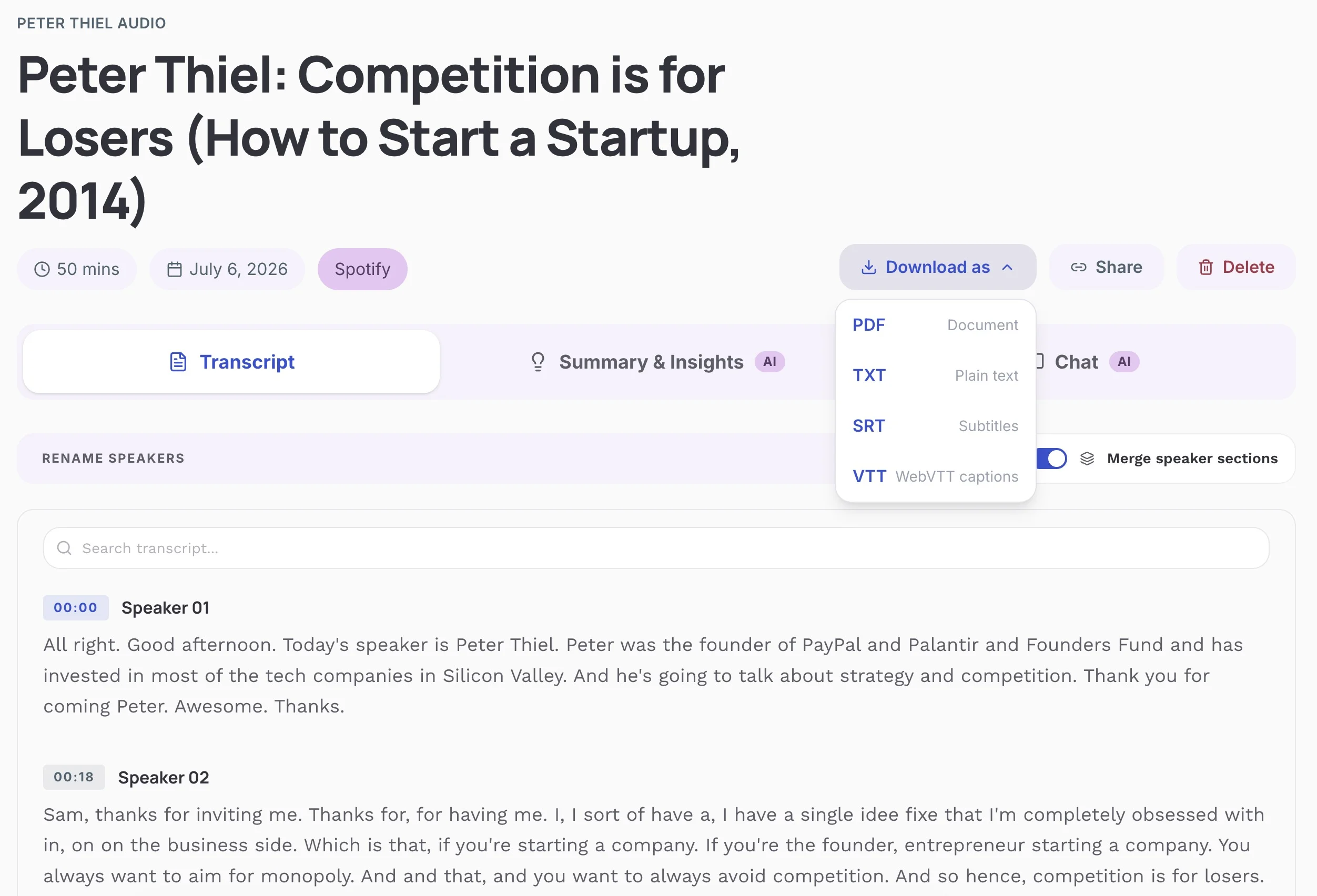
Copy the takeaways into your notes app. Or export the full transcript as PDF or TXT and annotate there. Both are native downloads. No print-to-PDF workaround.
Your first 30 minutes are free, no credit card. Try it →
Turning AI output into notes you'll actually use
The AI Insights panel is a first draft, not a finished notebook. Spend two minutes shaping it and the notes stick better.
Keep the takeaways that surprised you. Delete the ones you already knew. Generic "work hard" lines don't earn a slot.
Attach a quote when you can. Quotes make notes feel concrete, and speaker labels help when you're citing an interview guest later.
Use the transcript for the messy bits. Ctrl+F the PDF or TXT when a takeaway is fuzzy or you need the exact wording. That's why the full transcript matters even if you mostly live in the summary.
Park it where you already take notes: Notion, Obsidian, Apple Notes, whatever you open on Tuesday. Notes that stay only inside a transcription tool get forgotten.
If you're studying from podcasts long-term, flashcards from podcast transcripts pairs well once you have the text.
Other ways people try (and when they're fine)
Manual notes while listening
Works if the episode is short and you're already pausing a lot. Falls apart on dense interviews. You'll miss half of it while typing.
Snipd and similar "snip" apps
Players like Snipd let you tap during an episode and save a clip with AI notes. Nice if you're willing to leave Spotify. Less nice if you want to stay in Spotify and still walk away with an exportable transcript.
Paste a transcript into ChatGPT or Claude
Solid for custom note formats ("turn this into Cornell notes," "extract action items for my team"). You still need the transcript first. Pasting the Spotify URL into Podtyper gets you there faster than hunting for a copyable transcript inside Spotify, which you can't do anyway.
Show websites
Some podcasts publish their own notes or transcripts. Search "[episode title]" transcript or check the show site before you run anything. If it's already there, grab it and move on.
How the options compare
| Method | Notes you can keep | Full transcript | Stay in Spotify? | Cost |
|---|---|---|---|---|
| Podtyper (from URL) | Summary, takeaways, quotes | Yes (PDF, TXT, SRT, VTT) | Yes (just copy the link) | Free (first 30 min) |
| Spotify transcript / AI | Read in-app only | No export | Yes | Free |
| Manual pause-and-type | Whatever you typed | No | Yes | Free (your time) |
| Snipd-style apps | Clips + AI notes | Limited / no full export | No (new player) | Freemium |
| ChatGPT / Claude | Custom formats | Only if you paste one in | No | Varies |
Who this is for
Students use it to turn interview episodes into study notes without rewatching the whole thing, then search the transcript when an exam prompt rings a bell.
People who listen for work (product, marketing, research) pull takeaways into a shared doc after a commute listen. Faster than trusting "I'll remember that quote."
And if you keep a personal knowledge base, podcasts are dense enough that notes only help when they live next to your articles and book highlights. Those are the ones you find again in six months.
Frequently asked questions
Is there a Spotify podcast note generator?
Spotify does not offer a note generator that exports summary, takeaways, and quotes as files you own. Built-in transcripts and some AI Q&A features stay inside the app. To generate keepable notes from a Spotify episode, paste the episode URL into a tool like Podtyper and use the AI Insights panel.
Can I take notes from a Spotify podcast without listening?
Yes. Paste the episode URL into Podtyper, wait for processing, and read the summary and takeaways. You can skim the transcript for anything that looks important. Listening still helps for tone and nuance, but you don't need to sit through the whole episode to get usable notes.
What's the difference between podcast notes and a transcript?
A transcript is every word. Notes are the distilled version: summary, takeaways, quotes, topics. Podtyper gives you both. Most people copy the insights into their notes app and keep the transcript as backup.
Can I export Spotify podcast notes as PDF?
Yes. After transcription, export the full transcript as PDF or TXT. The AI summary and takeaways live in the AI Insights panel, so copy those into your notes app or into annotations on the PDF.
Does this work on iPhone or Android?
Yes. Copy the episode share link in the Spotify app, open podtyper.com in your mobile browser, paste the URL, and export when it finishes. Same flow as desktop.
How accurate are the AI notes?
They depend on the transcript. Transcription accuracy depends on recording quality, language, names, and overlapping speech. Review important passages against the audio. For measured results and limitations, see our transcription accuracy benchmark. Heavy music, overlapping speakers, or strong accents can introduce errors that show up in the summary too. For clean interview podcasts, the takeaways are usually solid enough to use after a quick skim.
Is it legal to create notes from a Spotify podcast?
Personal note-taking, research, and studying are generally fine. Republishing a full transcript or selling someone else's episode content can cross copyright lines. Keep notes for your own use unless you have rights to the show.
Free tier: how much can I note?
Podtyper's free plan includes 30 minutes of transcription per month with no credit card. That covers a short episode end-to-end, or the first half hour of a longer one. Paid plans start at $9.99/month for 800 minutes.
Spotify will keep the audio. It won't keep your notes for you.
Copy the episode link, paste it into Podtyper, pull the takeaways into wherever you already write things down. Two minutes beats a notebook full of half-finished pauses.
Related: how to get a Spotify podcast transcript, how to get an Apple Podcasts transcript, and how to get a YouTube podcast transcript.