
Want a Spotify podcast transcript as a PDF you can read, annotate, or send? Generate a separate transcript from supported public episode audio, then export it as a document.
Quick answer: Copy an episode's share link, paste it into the Spotify transcript tool, review the generated text, and choose Export → PDF. Your first 30 minutes are free. Longer episodes can require a paid plan to complete.
See what PDF and TXT exports look like
These downloadable examples use the same export code as Podtyper. The short script was written for this guide: it is an illustrative example, not a customer transcript or a transcription accuracy test. Speaker recognition is off, so the examples do not include speaker labels.
- Open the sample PDF transcript — paid export layout, without the preview watermark.
- Download the same transcript as TXT — editable text with timestamps.
- Open the free preview PDF example — shows preview branding and the watermark.
The sample begins:
[00:00] This is an illustrative podcast script written for the Podtyper export guide.

[00:12] Before quoting an episode, check the words against the original recording.

[00:24] Save a PDF for reading and annotation. Choose TXT when you want to edit the text in your notes.
A real export contains the text generated for your episode. The PDF includes the episode title, timestamps, page numbers, and an AI accuracy notice. A transcript file and the AI summary are separate outputs; review the transcript before treating it as a source.
How to export your Spotify episode as PDF
- In Spotify, open the episode and choose ⋯ → Share → Copy link. On desktop, use Share → Copy link to episode.
- Paste the episode URL into the Spotify transcript generator. Sign in or create your account, then choose Transcribe.
- Wait for processing to finish. Time varies with the recording and service load.
- Review the transcript, especially names, numbers, and passages you intend to quote. If the result is marked partial, it does not yet cover the whole episode.
- Open Export, then select PDF. Open the downloaded file and check the title and final timestamp before sharing it.
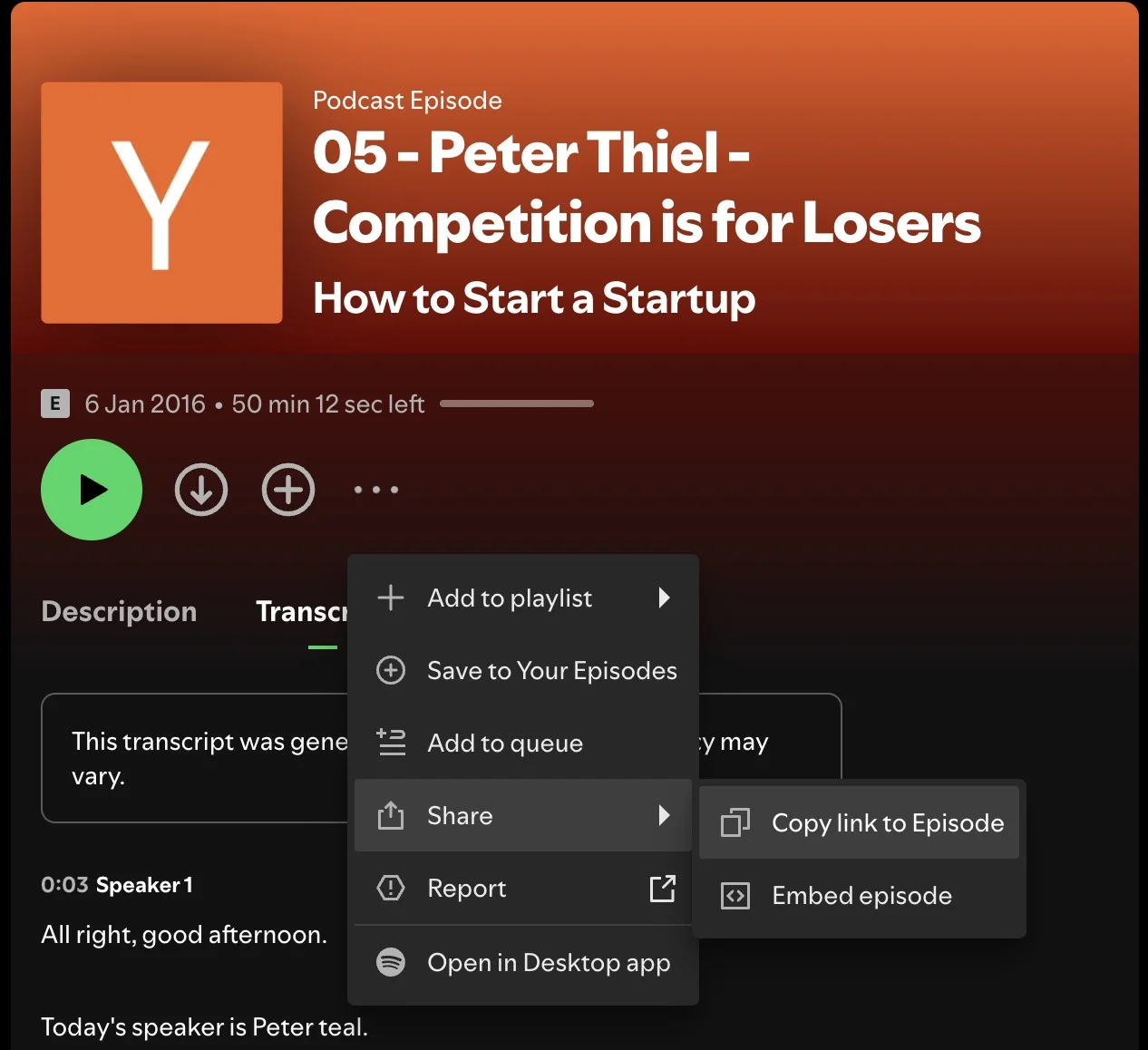
You can also export TXT, SRT, or VTT from the result. If you only need a few lines, follow the Spotify transcript copying guide.
PDF or TXT: which should you choose?
| Format | Use it for | What to expect |
|---|---|---|
| Reading, annotation, sending a document | Page layout with episode title and timestamps | |
| TXT | Editing, notes, text search, importing into other tools | Plain text you can copy and rearrange |
| SRT / VTT | Caption workflows | Timed cues; review timing before publishing |
Both PDF and TXT preserve the transcript's words and timestamps. Neither format fixes transcription errors. Listen back to consequential quotes and retain the episode link for citation.
What is free, and what changes on a paid plan?
PDF and TXT exports are available on the free tier. Your first 30 minutes are free; they do not renew each month. Free exports include preview branding, and a long episode may be only partially transcribed.
Paid plans supply additional minutes and remove the preview watermark from exports. Paying does not automatically finish an existing partial result: open the saved episode and choose Get full transcript when you have enough quota, then export again. See plans and monthly minutes before choosing a plan.
Can Spotify download the PDF for you?
The listener transcript view is a reading aid, rather than a PDF exporter. Eligible show owners have a different option: Spotify for Creators provides native transcript downloads. If you own the show and already have the VTT file, you can format that text in a document editor and save a PDF without generating another transcript.
Podtyper is useful when you need an independent document and have supported public audio. It does not extract the transcript displayed by Spotify.
Frequently asked questions
Can I export on iPhone or Android?
Yes. Copy the Spotify episode share link, open the Spotify transcript tool in your mobile browser, and export PDF after processing. Open the downloaded file using your browser's downloads or Files app.
Does this work when Spotify has no transcript?
It can, if the episode has accessible public audio. Built-in transcript availability is not required. Private feeds, subscription-only recordings, and inaccessible exclusive audio are unsupported; paying does not unlock them.
Does the sample PDF show a complete hour-long episode?
No. It is a short, explicitly illustrative script demonstrating the current export layout. The length of your own document depends on the audio transcribed and your available quota.
Can I publish the PDF?
Only share or publish material you have permission to use. A downloadable transcript does not grant rights to another creator's recording or words.