Apple added transcripts to the Podcasts app in iOS 17.4. You can read along, tap a word to jump to that moment, even search inside the episode. Useful stuff.
Try to select the text and copy it? Doesn't work. No export button either. Same read-only setup Spotify uses.
If you need the words in a doc, a paper, show notes, or an SRT file, you have to get them out some other way. This guide is for that. For RSS feeds and manual audio methods, see how to transcribe Apple Podcasts episodes.
Quick answer: Copy the episode URL from Apple Podcasts, paste it into the Apple Podcasts transcript generator, and download the transcript as TXT, SRT, or VTT in 1 minute. AI summary included. Works on iPhone, Mac, or any browser.
Method 1: Podtyper (fastest way to get an exportable transcript)
You don't copy text out of the app. You copy the link to the episode and transcribe the audio.
Go to podtyper.com, paste the URL, hit Transcribe. Most one-hour episodes finish in about three minutes.
Getting the episode URL:
On iPhone or iPad:
- Open the episode in Apple Podcasts
- Tap the three-dot menu (⋯)
- Tap Share Episode
- Copy the link
On Mac or in a browser: Go to podcasts.apple.com, find the episode, click the ⋯ menu next to it, and choose Copy Link.
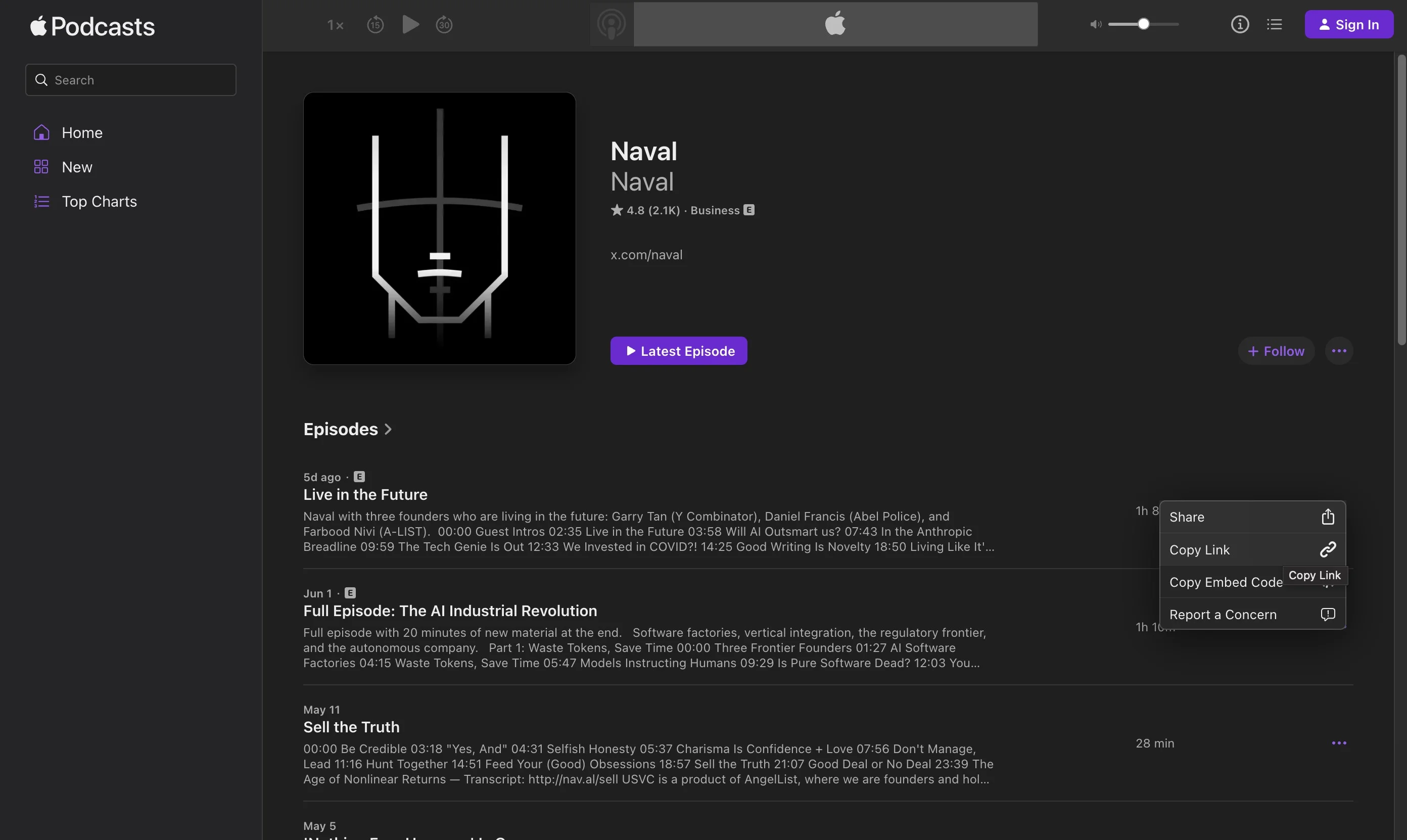
Example URL:
https://podcasts.apple.com/us/podcast/huberman-lab/id1545953110?i=1000642539619
What you get back:
- Full word-for-word text, not a summary
- Timestamps on every line
- AI summary, key takeaways, and notable quotes
- Export as TXT, SRT, or VTT
Apple's built-in transcript doesn't give you a file you can export or search outside the app. Podtyper returns a downloadable transcript with timestamps and AI insights.
Free tier: 30 minutes/month, no credit card. Start here →
Method 2: Apple Podcasts built-in transcript (iOS 17.4+)
Apple auto-generates transcripts for most English-language podcasts on iPhone and iPad running iOS 17.4 or later.
- Open Apple Podcasts and play (or pause) the episode
- Tap the episode title bar to open the full player
- Tap the transcript button (quotation marks icon) next to the chapter marker
- The transcript panel opens below the player
What's actually good here:
- Read-along with the current word highlighted
- Tap any word to jump to that point in the audio
- Search inside the episode from the transcript view
- Translation into other languages on supported devices
What you can't do:
- Copy or select text
- Download or export in any format
- Use it on Mac (the macOS Podcasts app still has no transcript view as of 2026)
- Get speaker labels
Fine for "what did they say around the 40-minute mark?" while you're still listening. Not fine for quoting, publishing, or pasting into anything else.
Method 3: Check the show's website first
Before you run transcription, search "[episode title]" transcript on Google or check the podcast's own site. News shows, interview podcasts, and education content often publish transcripts within a day or two.
Some creators link to external transcripts in Apple Podcasts show notes too. If it's already there, copy and paste. Done.
Comparison
| Method | Export | AI summary | Works on Mac | Cost |
|---|---|---|---|---|
| Podtyper (from URL) | TXT, SRT, VTT | Yes | Yes (browser) | Free (first 30 min free) |
| Apple built-in | No | No | No | Free |
| Show website | Usually copy/paste | Varies | Yes | Free |
What to do once you have the text
Research and quoting. Search the file with Ctrl+F, grab the exact line, check the timestamp, cite it. Beats scrubbing through a two-hour episode. For searching across multiple episodes, see how to search inside a podcast.
Show notes. Use the AI summary for your episode description, pull timestamps from the transcript. What used to take 45 minutes of re-listening takes about ten.
Captions. Export SRT or VTT and upload to YouTube, LinkedIn, or TikTok if you cut video from podcast audio.
Repurposing. A transcript is most of a blog post. Light editing, add headers, publish. See how to repurpose a podcast into blog posts.
Frequently asked questions
Can you copy text from Apple Podcasts' transcript?
No. The transcript viewer is display-only on iPhone and iPad. You can't select, highlight, or copy any of the text inside the app.
How do I download an Apple Podcasts transcript as TXT?
Copy the episode URL (Share Episode on mobile, or copy link from podcasts.apple.com on desktop), paste it into Podtyper, wait about 1 minute, then click Export and choose TXT. SRT and VTT are available too if you need subtitle files.
Does Apple Podcasts have transcripts on Mac?
Not in the native Podcasts app. Built-in transcripts are iOS/iPadOS only (17.4+). On Mac, open podcasts.apple.com in a browser, copy the episode link, and paste it into Podtyper.
Does Podtyper work with all Apple Podcasts episodes?
Any publicly available episode. It can't access private feeds, subscription-only episodes behind Apple Podcasts Subscriptions, or shows that have restricted their public audio.
What's the difference between Apple's transcript and an AI transcript?
Apple's version syncs to playback inside the app. No export, no timestamps you can take with you. An AI transcript from Podtyper gives you a downloadable file with export formats and typically 99%+ word-level accuracy on clean audio with state-of-the-art speech-to-text models.
Can I get an Apple Podcasts transcript on Android?
Apple Podcasts on Android doesn't have the built-in transcript feature. Copy the episode link from the web (podcasts.apple.com) or share it from another device, then paste into Podtyper in your browser.
How accurate is Apple Podcasts' built-in transcript?
Reasonably good for clear English audio. It struggles with proper nouns, overlapping speech, and strong accents. No export either. If you need something you can publish or cite, an AI transcript with timestamps and exports is usually worth the two-minute wait.
Apple's transcript is fine for reading along on your phone. It's not fine for getting text into a document.
Copy the episode link, paste it into Podtyper, download what you need. Two minutes of setup beats fighting with a read-only viewer. Prefer starting from a known show? Browse popular podcast transcript hubs.
Also on Spotify or YouTube? See how to copy a Spotify podcast transcript and how to get a YouTube podcast transcript.