
Transcribing a podcast used to mean hours of slow, painful listening and typing. Today, AI produces an accurate transcript of a one-hour episode in 1 minute.
This guide covers every method so you can pick the right one for your situation.
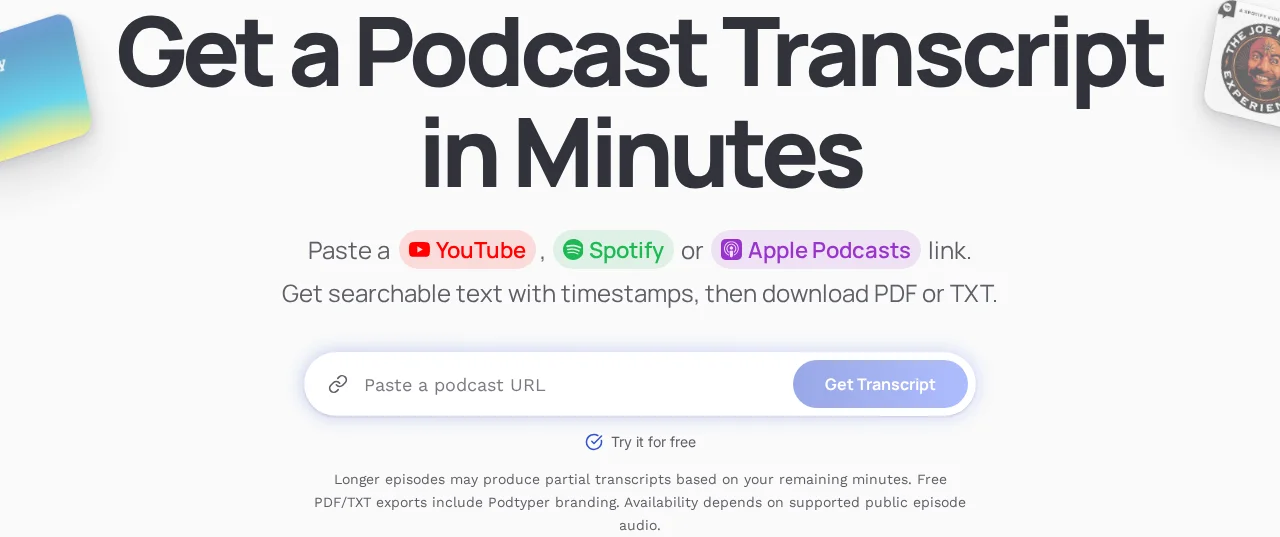
The episode-link form accepts supported public Spotify, YouTube, and Apple Podcasts URLs. Check the allowance explanation before submitting a long episode.
What is podcast transcription?
Podcast transcription converts spoken audio into written text. A good transcript has the full content word-for-word, speaker labels showing who said what, timestamps for navigation, and formatting that's actually readable. For a full definition with format details, see what is a podcast transcript.
If you want the shorter product-focused version, see our podcast transcription page for a direct overview of how Podtyper handles transcripts, exports, and AI insights. You can also meet the founder behind Podtyper and explore its document exports.
Transcripts serve different purposes depending on who you are: accessibility for deaf or hard-of-hearing listeners, searchable text for SEO, raw material for show notes and social content, a reference for guests or researchers.
Why bother?
SEO. Search engines can't listen to audio. A transcript turns every word you say into indexable text, helping your episode rank for the topics you discuss. Podcasts with transcripts get more search traffic than those without — consistently. More detail in podcast SEO with transcripts.
Accessibility. Roughly 15% of the world's population has some form of hearing loss. A transcript makes your content accessible to listeners who are deaf, hard of hearing, or who prefer to read. If budget is the constraint, start with best free podcast transcription software.
Content repurposing. A transcript is the raw material for blog posts, social media quotes, email newsletters, video captions, and more. One recording session, many content pieces.
Show notes. Instead of writing show notes from scratch, pull key moments, quotes, and summaries directly from the transcript.
The 4 methods
Manual transcription
Listen to the episode and type out every word. Tools like oTranscribe (free, browser-based) help with keyboard shortcuts for playback control.
It's free and you control the accuracy completely. The problem: expect 4-6 hours per 1-hour episode, according to industry transcription benchmarks. Tedious, mentally draining, and not something most people do more than once.
Only practical for occasional short clips.
Human transcription service
Services like Rev, Scribie, or GoTranscript have human transcriptionists listen and type your audio. Turnaround is typically 12-48 hours. Cost is around $1-2 per minute of audio. For a full cost comparison across all methods, see our podcast transcription cost guide.
Accuracy is excellent, especially on difficult audio — accents, crosstalk, technical jargon. No setup required. But a 1-hour episode costs $60-120, which rules it out as a regular workflow for most people.
Good for high-stakes content where accuracy is critical and budget allows. Not practical for every episode.
ASR software
Download your audio files and run them through speech recognition software locally or via API. Options include OpenAI Whisper (free, open-source), AssemblyAI, or state-of-the-art speech-to-text APIs.
Very accurate on modern models. Can be automated and scaled. Whisper is completely free.
The friction: technical setup (command line, Python, API keys), you need the audio file downloaded first, no UI — just raw output. Great for developers. Too much friction for most podcasters.
AI podcast transcription tool
Paste a podcast URL. The tool handles downloading the audio, running it through AI, and returning a formatted transcript with timestamps. No files to manage, no code to write.
Works directly from a Spotify or Apple Podcasts link. Results in a few minutes. Timestamps and export formats included automatically. Often includes bonus AI features — summaries, key takeaways, quotes — that save additional work.
The only real downside: free tiers have monthly minute limits. But for most use cases the free tier covers you, and the paid tiers are cheap relative to the time saved.
This is the right choice for the vast majority of podcasters.
Podtyper returns a transcript with timestamps and AI insights. Accuracy varies with recording conditions; see our reproducible transcription benchmark for measured results and limitations. Try it free →
Step by step: transcribing a podcast with Podtyper
Step 1: Copy the episode URL
Go to Spotify, Apple Podcasts, or YouTube and copy the URL of the episode you want. Any publicly accessible episode works.
Spotify:       https://open.spotify.com/episode/4rOoJ6Egrf8K2IrywzwOMk
Apple Podcasts: https://podcasts.apple.com/us/podcast/huberman-lab/id1545953110?i=1000642539619
YouTube:       https://www.youtube.com/watch?v=LTWgWFQmZd4
Step 2: Paste into Podtyper
Go to podtyper.com and paste the URL. Click Transcribe.
Step 3: Wait a few minutes
A 1-hour episode typically completes in 1 minute.
Step 4: Review and export
Your transcript appears with timestamps on every line. Export as TXT (plain text), SRT (timestamped subtitles), or VTT (WebVTT captions). The AI summary, key takeaways, and best quotes are ready to drop into your show notes.
Getting cleaner output
AI transcription accuracy is directly proportional to audio quality. Recording with a decent microphone in a quiet environment is the single biggest factor. A $50 USB microphone in a quiet room will outperform a $500 mic in an echoey space every time.
Very fast speech increases errors. Background music under speech is hard for AI to handle — if possible, record without music beds under the main dialogue.
Always do a quick scan for proper nouns and technical terms after you receive the transcript. Those are where errors cluster.
What to do with the transcript
Show notes. Copy key points and timestamps. Use the AI summary as your episode description. Done in 5 minutes instead of 45. To turn those timestamps into navigation for listeners, follow our guide to adding chapters to your podcast.
Blog post. A podcast transcript is already a blog post — it just needs light editing. Add headers, pull out the best quotes, publish. Instant SEO content.
Social media. Search the transcript for your 3-5 most quotable moments. These become Twitter/X posts, LinkedIn quotes, or Instagram captions.
Video captions. Export as SRT or VTT and upload directly to YouTube, TikTok, or LinkedIn. Captions increase video watch time.
Resource page. If your podcast covers a recurring topic, collect related transcripts into a resource page. Creates a content hub that ranks for niche keywords.
Frequently asked questions
How accurate is AI podcast transcription?
Transcription accuracy depends on recording quality, language, names, and overlapping speech. Review important passages against the audio. Accuracy drops on heavy accents, crosstalk, poor audio quality, or highly technical vocabulary. For professional podcast recordings, expect very high accuracy with minimal corrections.
Can you transcribe a podcast for free?
Yes. Podtyper offers 30 minutes of free transcription per month, no credit card required. OpenAI Whisper is also free and open-source, but requires technical setup.
How long does it take?
With AI tools, a 1-hour podcast takes 1 minute. Manual transcription takes 4-6 hours per hour of audio. Human services take 12-48 hours.
Can I transcribe a podcast I don't own?
For personal research, accessibility, or private use — generally yes. If you plan to publish the transcript, be aware of copyright. The content belongs to its creators. Check the show's terms or reach out to the creator if you're unsure.
Do transcripts help with SEO?
Significantly. Google crawls and indexes text, not audio. Adding a transcript to your podcast page gives search engines hundreds or thousands of words per episode. Many podcasters see meaningful increases in search traffic after adding transcripts consistently.
If you also want to rank for the broader head term itself, keep one dedicated landing page focused on that exact intent. Our example is here: Podcast Transcription Services.
Method comparison
| Method | Speed | Accuracy | Cost | Effort |
|---|---|---|---|---|
| Manual typing | Very slow | Perfect | Free | Very high |
| Human transcription | 12-48 hrs | Excellent | $1-2/min | Low |
| ASR software | Fast | Very good | Free-low | Medium (setup) |
| AI podcast tool | 1 min | Excellent | Free tier available | Very low |
For most podcasters, an AI transcription tool wins on every dimension that matters: accuracy, speed, cost, and effort. The free tier is enough to get started.