You found the transcript button in Spotify. You tap a line, try to select it, and nothing happens. The text scrolls while the episode plays, but you can't highlight it, copy it, or save it anywhere.
That's by design. Spotify's transcripts are read-only inside the app.
If you need the text for a quote, a paper, show notes, or captions, you need to get it out some other way. This guide is about that specific problem. For the full rundown of every method (built-in, AI, RSS, show websites), see how to get a Spotify podcast transcript.
Quick answer: You can't copy from Spotify's built-in transcript viewer. Copy the episode URL instead, paste it into the Spotify podcast transcript generator, and download the result as PDF, TXT, SRT, or VTT. Most episodes finish in 1 minute.
Why Spotify won't let you copy or export
Spotify built transcripts as a listening aid. Read along, tap to jump, search inside the episode. All of that happens inside the app.
They didn't build export because the transcript isn't meant to leave Spotify. Same reason you can't download episode audio from the app. The content stays in their ecosystem.
Fine for casual listening. Annoying if you actually need the words in a document.
The fix: transcribe from the episode URL
You don't need to copy text out of Spotify. You copy the link to the episode and run transcription on the audio instead.
Go to podtyper.com, paste the URL, hit Transcribe. You get a full transcript you can copy, edit, and download.
Getting the episode URL:
- Desktop: right-click the episode → Share → Copy link to episode
- Mobile: tap ⋯ → Share → Copy link
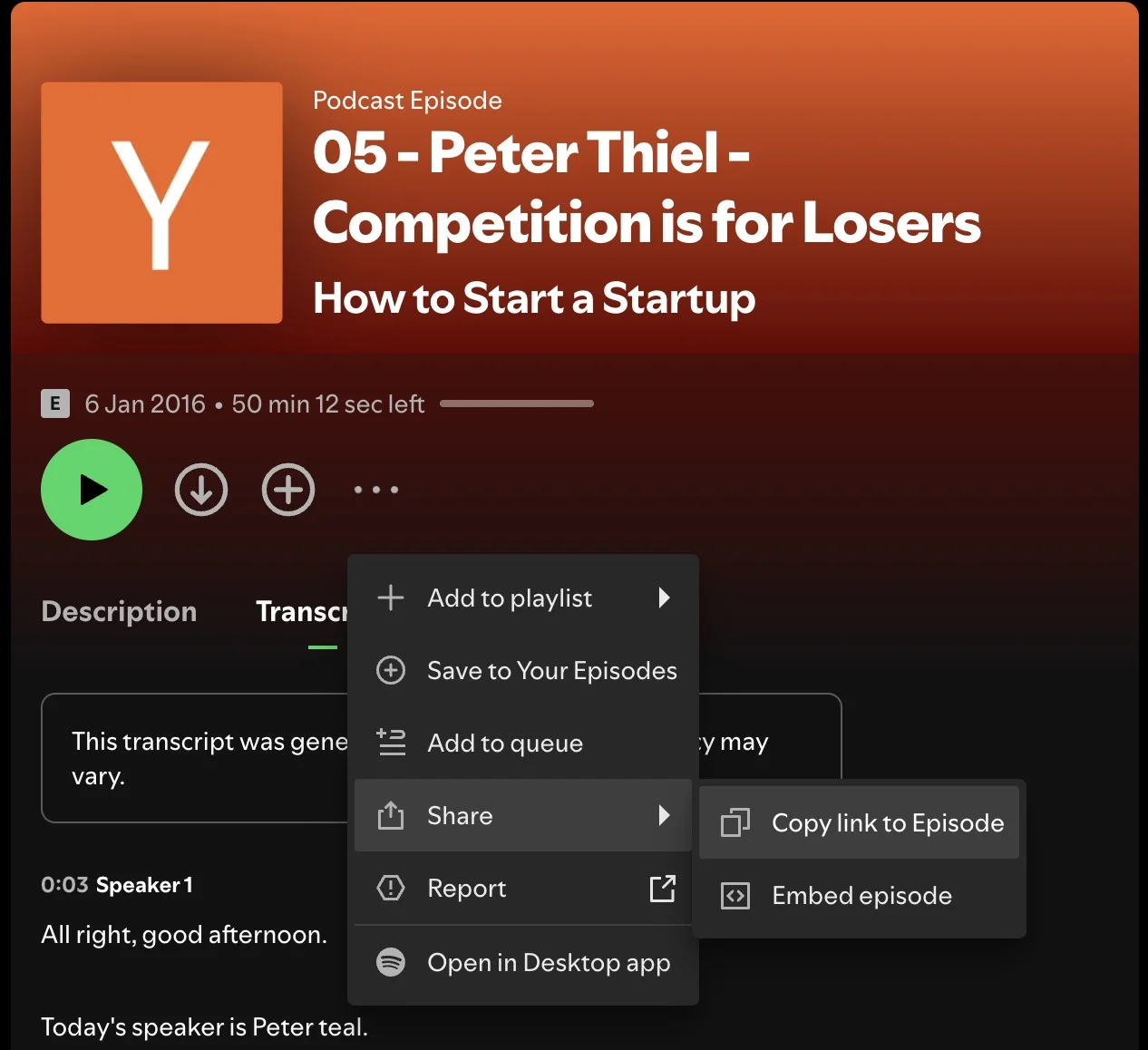
Example URL: https://open.spotify.com/episode/4rOoJ6Egrf8K2IrywzwOMk
What comes back:
- Full word-for-word text (not a summary)
- Timestamps on every line
- AI summary, key takeaways, and notable quotes
- Export as PDF, TXT, SRT, or VTT
- A one-hour episode usually takes about three minutes
Free: 30 minutes/month, no credit card. Try it →
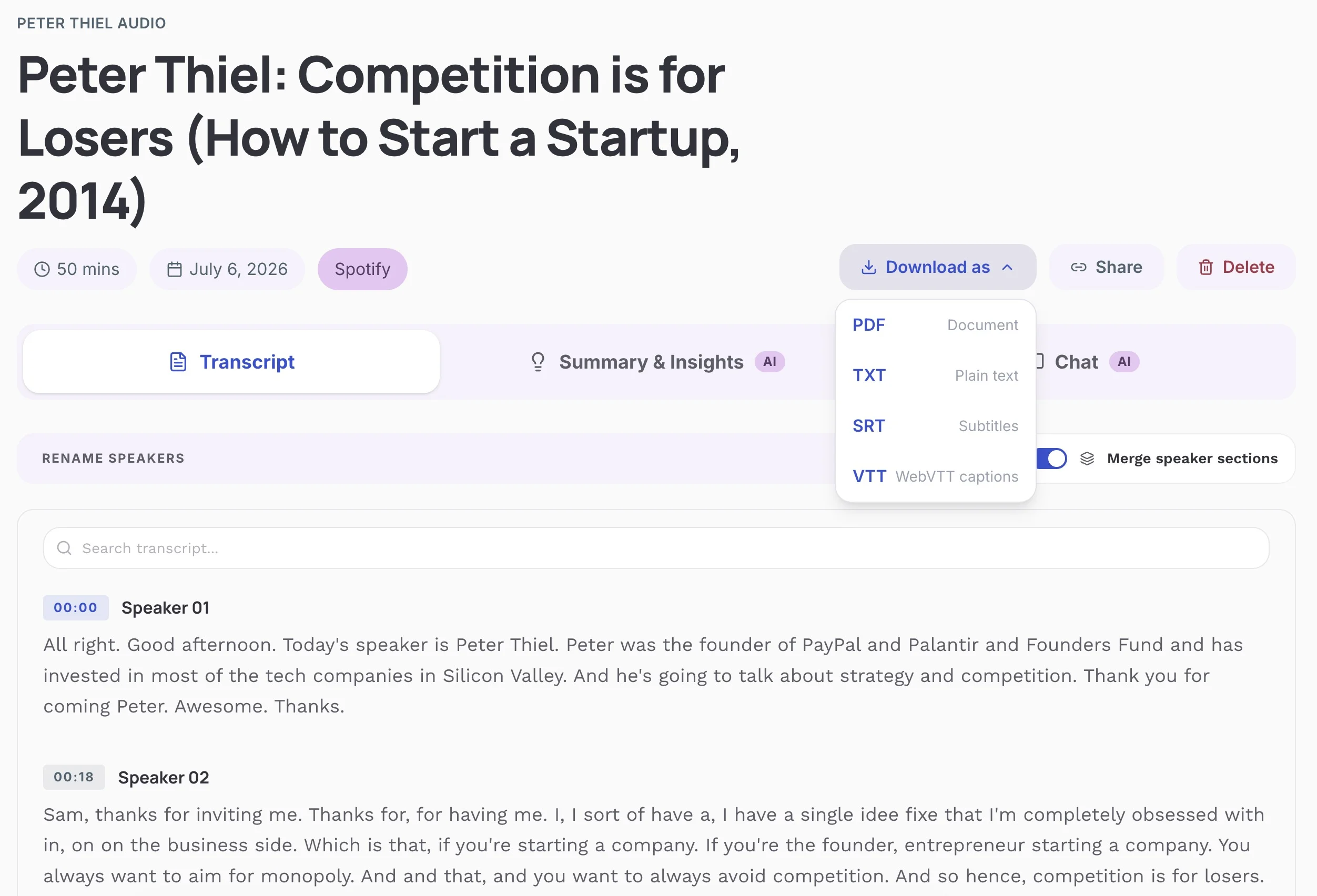
Once you have the file, copy whatever you need. Paste a quote into Google Docs. Download the whole thing as TXT or PDF. Upload SRT captions to a video clip. For the PDF-focused walkthrough, see how to export a Spotify podcast transcript as PDF.
What Spotify's built-in transcript is actually good for
Some episodes show a Transcript button below the player (desktop) or in the expanded player view (mobile). When it's there, you can read along and tap any line to jump to that moment in the audio.
That's it. No select, no copy, no download. No speaker labels either. Just one block of text scrolling with the audio.
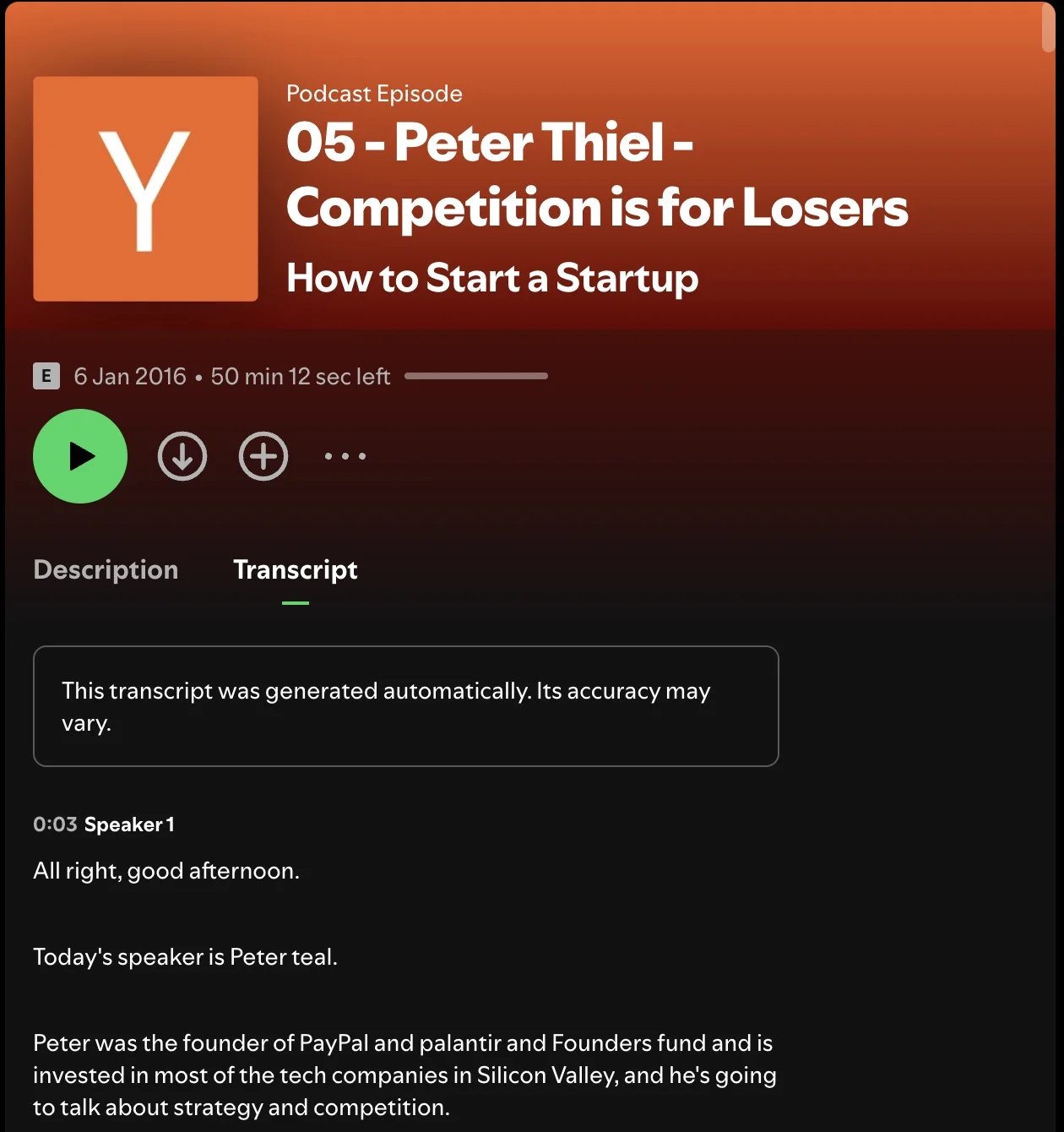
Works if you heard something interesting and want to re-read that section while still in Spotify. Doesn't work if you need the text anywhere else.
Other ways to get copyable text
Check the show's website first
Before you transcribe anything, search "[episode title]" transcript on Google or check the podcast's own site. A lot of interview shows and news podcasts publish transcripts within a day or two. If it's already there, copy and paste. Done.
Some creators link to external transcripts in Spotify show notes too.
RSS feed + manual transcription
Every public Spotify podcast has an RSS feed. Find the feed URL, download the episode MP3, upload it to a transcription service. It works, but it's a lot of steps compared to pasting the Spotify link directly. Only worth it if you're building an automated pipeline. See the full Spotify transcript guide for details.
Workarounds that aren't worth your time
Screen recording + OCR. People try this. The transcript scrolls, you record the screen, run OCR on the frames. The output is messy, slow, and often wrong on proper nouns. Just use the episode URL.
Browser extensions that promise to "extract" Spotify transcripts. Most break when Spotify updates their player. Even when they work, you're scraping display text without speaker labels or timestamps. Pasting the URL into a transcription tool is faster and gives you a cleaner file.
Retyping what you see. Please don't.
How the options compare
| Method | Can you copy? | Export formats | AI summary | Cost |
|---|---|---|---|---|
| Podtyper (from URL) | Yes | PDF, TXT, SRT, VTT | Yes | Free (first 30 min free) |
| Spotify built-in | No | None | No | Free |
| Show website | Usually yes | Copy/paste | Varies | Free |
| RSS + upload | Yes | Depends on tool | Depends | Varies |
What to do once you have the text
Research and quoting. Paste the transcript into any editor and search with Ctrl+F. Find the exact quote, check the timestamp, cite it properly. Much faster than scrubbing through a two-hour episode. If you need to search inside a podcast across multiple episodes, download transcripts for each and search the files together.
Show notes. Pull timestamps from the transcript, grab the AI summary for your episode description. What used to take 45 minutes of re-listening takes about ten.
Personal notes. If what you actually want is takeaways and quotes you can keep (not the full transcript), see how to create notes from a Spotify podcast.
Captions and clips. Export as SRT or VTT and upload to YouTube, LinkedIn, or TikTok. Useful if you cut video clips from podcast episodes.
Frequently asked questions
Can you copy text from Spotify's transcript?
No. Spotify's transcript viewer is display-only. You can't select, highlight, or copy any of the text in the app on desktop or mobile.
Why doesn't Spotify let you export transcripts?
Spotify designed transcripts as an in-app feature for reading along while listening. Export would let you take the text outside their platform, which they haven't enabled. To get an exportable file, use a third-party transcription tool with the episode URL.
How do I save a Spotify podcast transcript as TXT or PDF?
Copy the episode URL from Spotify, paste it into Podtyper, wait about 1 minute, then click Export and choose TXT or PDF. Both are native downloads — no print-to-PDF workaround. Podtyper also exports SRT and VTT if you need subtitle files. Step-by-step for PDF: how to export a Spotify podcast transcript as PDF.
Does Spotify have transcripts for all podcasts?
No. Spotify generates transcripts for a subset of shows, mostly popular English-language podcasts. Many smaller or non-English shows don't have them. Podtyper works with any public Spotify episode whether or not Spotify has generated a transcript for it.
What's the difference between Spotify's transcript and an AI transcript?
Spotify's version is synced to playback inside the app. You can't export it, and there's no clean file to take with you. An AI transcript from a tool like Podtyper gives you a downloadable file with timestamps and export options. Accuracy on clean audio is typically 99%+ word-level accuracy with state-of-the-art speech-to-text models.
Can I download a Spotify transcript on iPhone or Android?
Not from Spotify directly. The mobile app has the same read-only transcript viewer as desktop. To get a downloadable transcript on your phone, copy the episode share link, open podtyper.com in your browser, paste the URL, and export when processing finishes.
Is it legal to transcribe a Spotify podcast?
Transcribing for personal use (research, note-taking, accessibility) is generally fine. Redistributing the full transcript or using it commercially without permission could infringe copyright. Podtyper is built for personal and creator use, not republishing someone else's show verbatim.
Spotify's transcript button is useful for following along. It's not useful for getting text into a document.
Copy the episode link, paste it into Podtyper, download what you need. Two minutes of setup beats twenty minutes of fighting with a read-only viewer.
Same problem on other platforms: how to get an Apple Podcasts transcript and how to get a YouTube podcast transcript.