A colleague forwards a 70-minute interview with a regulator, or a CLE episode you will not sit through between calls. You need the quote, the minute, and enough context to know whether it is worth a second look. Dragging the playhead around is a bad use of the afternoon.
Podcast transcription for lawyers means that job: a public episode, notes you can search, and a line you check before you repeat it.
Podtyper takes a public link from Spotify, Apple Podcasts, or YouTube. A deposition, a filing, a client call, or anything privileged does not belong here. If the audio is not already a published episode, stop and use whatever your firm already approves for confidential recordings.
For the general comparison of editors, meeting tools, and human transcription, see best podcast transcription tools.
Quick answer: For a public legal podcast, copy the episode URL and paste it into Podtyper. You get a searchable transcript, timestamps, and a PDF or TXT download. Read any line you would rely on. The first 30 minutes are free.
What you actually get
Paste the episode link. You do not download the file first, and you do not need an RSS feed.
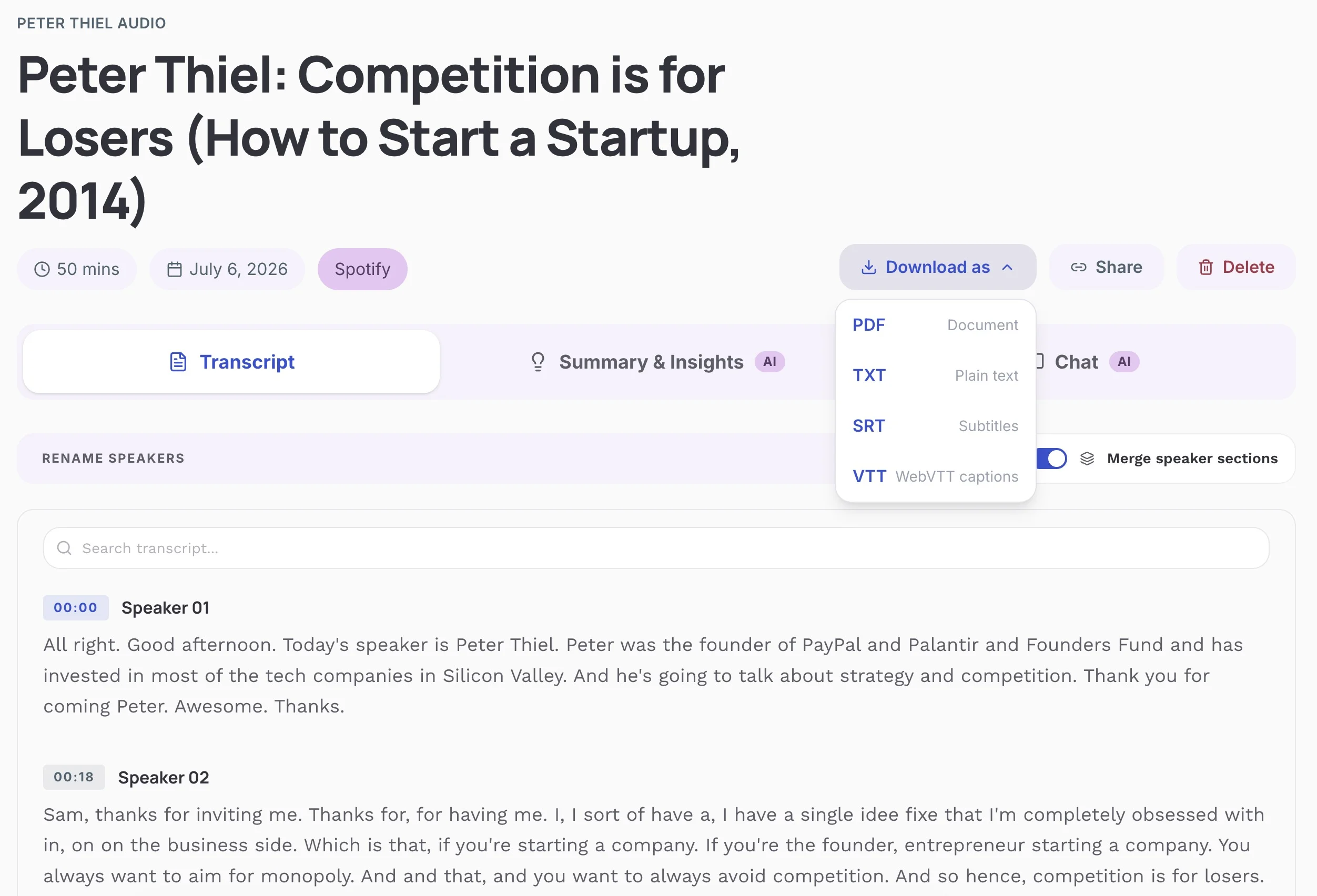
Most episodes are ready in a few minutes, including hour-long shows. The page has:
- The transcript, with timestamps when the recording supports them
- Search, so you can jump to a statute name, an agency, or a guest
- A summary, key takeaways, topics, and notable quotes
- Speaker labels when the audio separates voices
- Export as PDF, TXT, SRT, or VTT
On clean audio, word-level accuracy is typically 99%+. Case names, citations, Latin, and two people talking over each other are exactly where a "pretty good" transcript embarrasses you. PDF and TXT files include a note that the text is AI-generated and may contain mistakes. If you are going to repeat a sentence to a client or in a memo, play the timestamp.
Speaker labels are labels, not a captioner who knows the bar. Rename them from the show notes before you circulate the file.
Audio from the episode is deleted from Podtyper's servers after processing. The transcript is stored encrypted. That is a reasonable setup for a public episode. It does not turn the product into a confidential-records system.
The free plan is the first 30 minutes, no card. Paid plans start at $9.99/month for 800 minutes. Premium is $24.99/month for 3,000 minutes. See pricing if a partner expects this every week.
Where I would use it, and where I would not
Public interview. Opposing counsel, a regulator, a professor, a journalist, on a show anyone can play. Search the transcript for your issue, copy the passage with the timestamp, and listen to that minute before you treat it as said. Citing "a podcast" from memory is how memos go soft. A timestamped line is at least checkable. How to search inside a podcast is the same trick across a stack of episodes: export TXT and search the files.
CLE or a bar-association show. You want the rule they discussed, not a vibe. The summary is a table of contents. The transcript is where you confirm they were talking about the amendment you think they were talking about. Generated summaries smooth over hedges. Lawyers hedge on purpose.
Client update. A general counsel asks what a guest said about enforcement last week. Send the paragraph and the timestamp, after you have played it. Do not send the raw file as if it were a certified transcript.
A filing, a hearing binder, or anything a court might treat as the record. Use a human transcription service and then read it yourself. The tool comparison explains when that cost is the point. Speed is the wrong priority there.
Privileged or private audio. Do not paste it anywhere that expects a public episode URL. There is no "upload the deposition" step in this product, and you should not go looking for one.
What the other options are for
Spotify and Apple transcripts, when the episode has one, are for following along in the app. You cannot copy them out. Fine if you are already listening. Useless if you need a sentence in a document.
Meeting tools such as Otter are built for live calls and uploaded files. If your days are Zoom calls, you may already have one open. For an episode that is already on Spotify, you are adding a download you do not need.
Descript is for cutting audio by editing text. That is a production job.
Human transcription costs more and takes longer. Use it when a misheard word is more expensive than the invoice. An AI transcript plus your own playback is enough for research notes. It is not enough for the version that leaves the firm.
How the options compare
| Approach | Public podcast link | You can search and copy | Use in a filing |
|---|---|---|---|
| Podtyper | Yes | Yes | No, not without a separate human review |
| Spotify or Apple transcript | Already in the app | No | No |
| Meeting transcription tool | Usually an upload or a live call | Yes | No |
| Human transcription | Only if you have a file they accept | Yes | Closer, and you still read it |
A note on quoting and copyright
Personal research and note-taking are generally fine. Republishing a full transcript of someone else's show, or dropping the entire episode into a client newsletter, can be a copyright problem. Quote the passage you need, cite the episode, and keep the file in the matter notes.
This post is not legal advice. It is a description of a transcription workflow. Your jurisdiction, your firm policy, and the show's terms still apply.
Frequently asked questions
What is the best podcast transcription tool for lawyers?
For a public episode you need to search and quote, Podtyper. Paste the Spotify, Apple Podcasts, or YouTube link. For a deposition, a client recording, or a transcript you might file, use a human transcription process your firm approves. Do not run confidential audio through a consumer podcast tool.
Can I use an AI transcript in a brief or a filing?
Not as the record. On clean audio, word-level accuracy is typically 99%+, and that is still the wrong standard for a filing. Case names and citations are easy to mishear. If a document needs a transcript, order a human one and review it. Use the AI text to find the minute, then listen.
Does Podtyper work with legal podcasts on Spotify and Apple Podcasts?
Yes, when the episode is public. Copy the share link and paste it in. A private or unlisted episode will not work. Built-in app transcripts, where they exist, cannot be copied out of the app.
Are the transcripts private?
Audio is deleted from Podtyper's servers after processing, and transcripts are stored encrypted. That covers the public episode you pasted. It is not a privilege review, and it is not a reason to upload confidential recordings.
How much does it cost?
The first 30 minutes are free, with no card. Paid plans start at $9.99/month for 800 minutes. Premium is $24.99/month for 3,000 minutes. One minute of audio uses one minute of quota.
Can I do this from my phone between meetings?
Yes. Copy the episode link from the share sheet, open Podtyper in the browser, and export PDF or TXT when it finishes.
Will it get case names and citations right?
Sometimes. Often enough to find the passage. Not often enough to paste a citation into a memo without checking. Listen to the timestamp and confirm the reporter, the court, and the spelling.
Find the minute, play the minute, then decide what the guest actually said.
Transcribe a public legal episode →
Associates who are really using this for class readings should use the student guide instead. The product overview is podcast transcription.